Gaming PC Budget Guide 2026: What You Get for $800 vs. $1,500 vs. $2,500
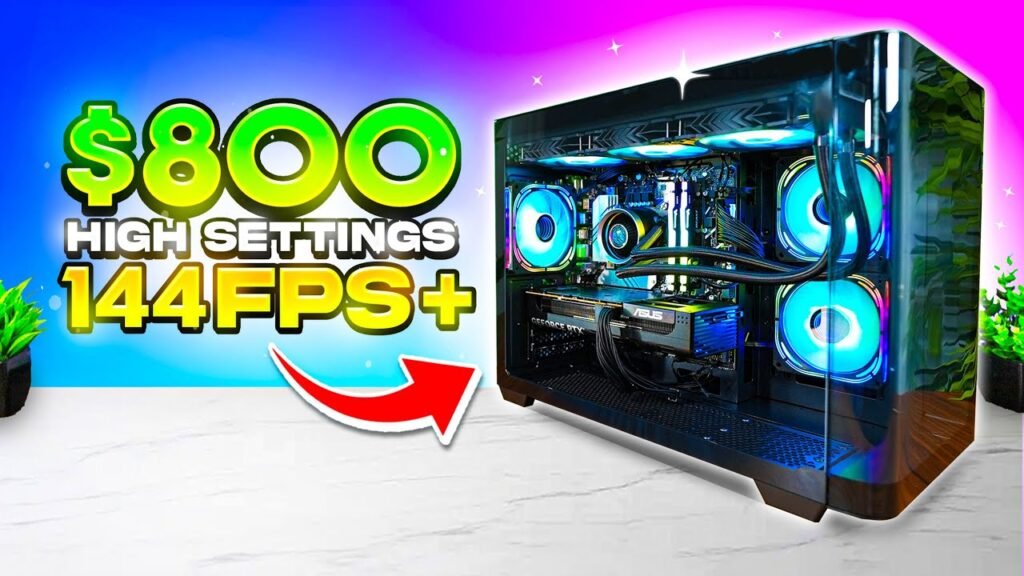
Looking for a gaming PC budget guide that tells you the truth—not just what retailers want you to spend? You’re in the right place.
Here’s the problem every new PC gamer faces: You start researching gaming PC budgets, and within minutes you’re buried in conflicting advice. One person says you need $2,000 for a ‘real’ setup. Another swears you can build something decent for $500. Who’s actually right?
The honest answer? Both. And neither.
After building 50+ gaming PCs over the last decade and tracking 2026 prices across every major retailer, I’ve learned that gaming PC budgets aren’t about magic numbers—they’re about matching your money to your expectations. A $800 PC and a $2,500 PC are both ‘gaming PCs.’ They just deliver completely different experiences.
In this gaming PC budget guide, you’ll learn exactly what each price tier gets you, with real 2026 parts lists and honest performance expectations. By the end, you’ll know exactly how much you need to spend for the gaming experience you want.
Before we dive into the numbers, here’s the single most important thing to understand about PC gaming budgets: The law of diminishing returns hits hard. The jump from $800 to $1,200 is massive. The jump from $1,200 to $2,000? Noticeable, but smaller. From $2,000 to $3,000? Mostly bragging rights and RGB lighting…
The Truth About Gaming PC Budgets
Let’s understand first why is there so much conflicting advice about gaming PC budgets?
It comes down to three things:
- Expectations,
- timing,
- and priorities.
What Your Gaming PC Budget Actually Depends On
1. Expectations:
What do you want the experience to feel like?
The word ‘run’ means different things to different people. For some gamers, ‘runs fine’ means 30 frames per second at low settings—playable, but not pretty. For others, it means 144 fps at ultra settings with ray tracing enabled.
If someone tells you a $800 PC is plenty, ask yourself: “Are they happy with 1080p and medium settings?” If someone insists you need $2,500, ask: Are they chasing 4K and max frame rates?
Your budget isn’t about what a PC costs—it’s about what experience you’re willing to pay for.
2. Timing:
When did they build their PC, and when are you building yours?
PC component prices fluctuate wildly. A build that cost $1,200 in 2023 might cost $900 today—or $1,500 if there’s a GPU shortage. Someone giving advice from six months ago might be quoting prices that no longer exist.
In 2026 specifically, we’re seeing DDR5 Ram skyrocket due to shortage and ai needs.
Your timing affects your budget more than you’d think.
3. Priorities:
What do they care about vs. what do you care about?
Some gamers prioritize raw FPS and will cut every corner to maximize frame rates. Others care about aesthetics—RGB lighting, clean cable management, a specific case. Some need quiet operation for shared living spaces. Others want overclocking headroom.
When someone says “you only need X dollars,” they’re projecting their priorities onto your build. But maybe you care about things they don’t.
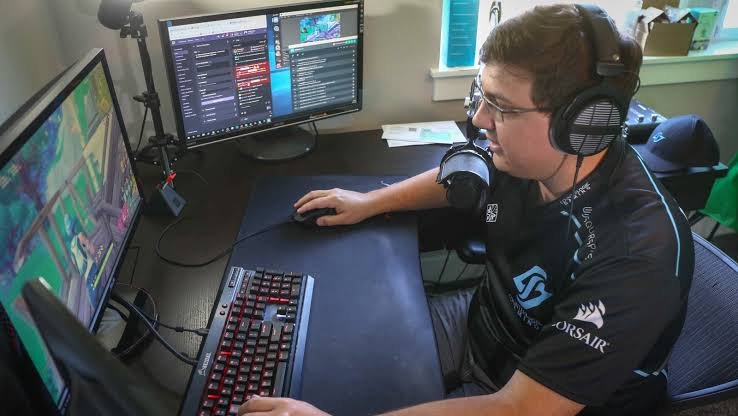
So, in the end, the gamer who’s happy playing Fortnite and Valorant at 1080p will tell you $800 is plenty. The enthusiast running Cyberpunk 2077 with ray tracing at 4K will insist you need $2,500. They’re both right—for their specific needs.
With expectations, timing, and priorities in mind, here are the universal truths that apply to every gaming PC budget—and how your choices change the math.
The Law of Diminishing Returns in Gaming PCs
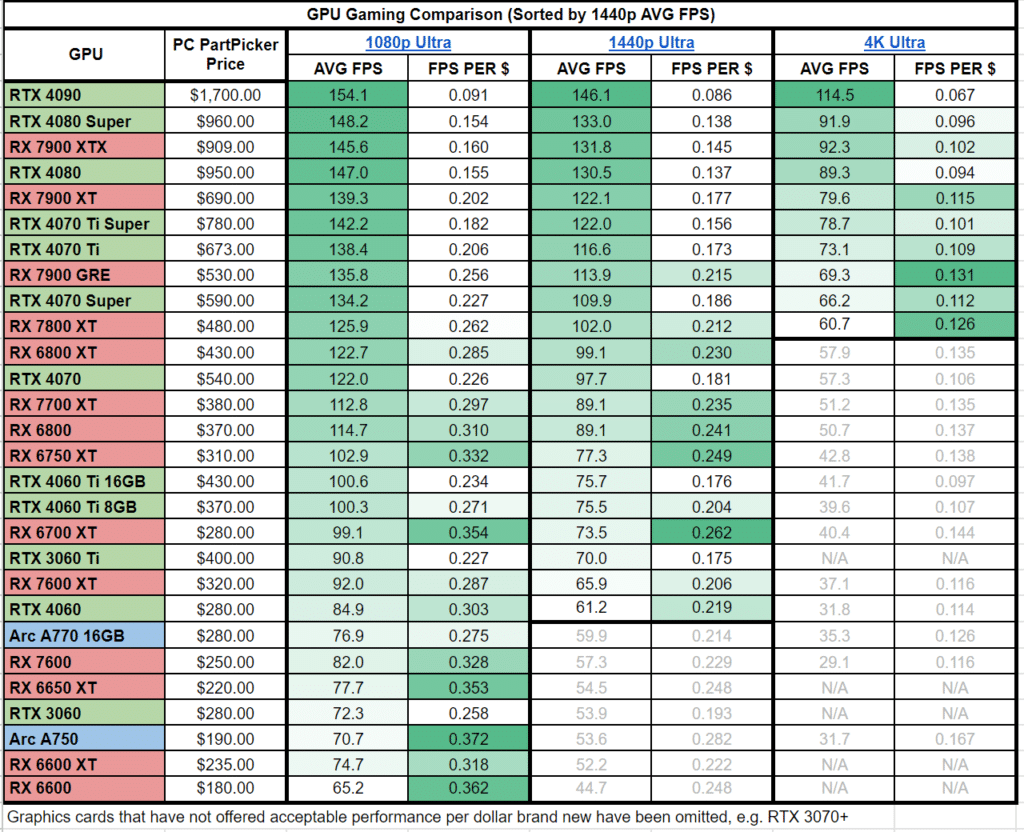
Now that you understand how your expectations shape your budget, let’s look at the hard math behind what each dollar actually buys you.
Here’s the most important concept to understand when planning your gaming PC budget: The law of diminishing returns hits PC hardware harder than almost any consumer product.
Let me show you what I mean with real 2026 pricing:
Price Point | Performance Gain | Cost Per Frame (Approx.) |
$800 → $1,200 | +70-80% more FPS | ~$5 per extra frame |
$1,200 → $2,000 | +30-40% more FPS | ~$20 per extra frame |
$2,000 → $3,000 | +10-15% more FPS | ~$66 per extra frame |
What this means for your expectations:
- If you expect 1080p gaming at solid frame rates, you can stop at the $800–$1,200 range and be perfectly happy. The curve is your friend.
- If you expect 1440p high-refresh or 4K, you need to climb further up the curve—but you’ll pay exponentially more for those last few frames.
- If you expect max settings with ray tracing at 4K, you’re on the steep part of the curve where every extra frame costs dearly.
Your expectations determine which part of this curve you need to be on. Be honest with yourself, and you’ll save hundreds of dollars.
Why Future-Proofing Your Gaming PC Is a Myth
This brings us to the second factor: timing. The urge to ‘future-proof’ comes from wanting to buy once and forget about upgrades—but here’s why that thinking backfires…
You’ll hear PC enthusiasts throw around the term ‘future-proofing’ constantly. “Spend more now so you don’t have to upgrade for five years!“
Here’s the truth about gaming PC budgets and future-proofing: You can’t future-proof a PC.
Why? Three reasons:
- GPU technology leaps every 2-3 years. A $1,500 GPU today will be matched by a $500 GPU in 3-4 years. Your ‘future-proof’ purchase gets lapped by the clock.
- New games raise the bar. Cyberpunk 2077 would have been unthinkable on 2015’s ‘future-proofed’ hardware. Games in 2028 will push hardware we can’t even imagine today.
- Standards change. PCIe 3.0 → 4.0 → 5.0. DDR4 → DDR5. What’s ‘future-proof’ today is obsolete tomorrow because the timing wasn’t right.
The smarter approach for your specific timing:
Buy for what you need Now, with a small eye on the next 2-3 years. Then plan to sell your GPU and upgrade when you actually need more performance.
When you build matters more than how much you spend. A $1,200 PC built at the right time (when prices are low and new tech is stable) will outlast a $2,000 PC built at the worst time (during shortages or right before a generational leap).
Gaming PC Budget Allocation: Where Your Money Should Go
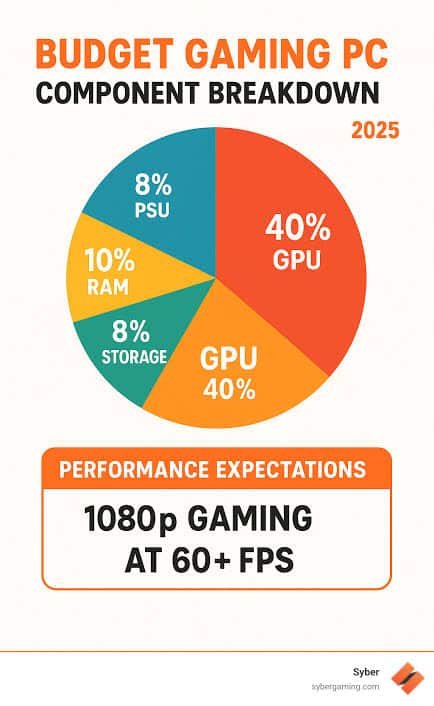
Finally, let’s talk about priorities. Once you know what experience you expect and when you’re buying, you need to align your spending with what you actually value.
When you’re setting your gaming PC budget, here’s how your dollars typically break down:
The 50/30/20 Rule for Gaming PCs:
- 50% Graphics Card (GPU) – The heart of any gaming rig
- 30% Supporting Cast – CPU, motherboard, RAM, storage
- 20% The Foundation – Power supply, case, cooling, peripherals
Why the GPU gets half your budget: In gaming, your graphics card does about 80% of the work. A $1,500 build with a $750 GPU will outperform a $1,500 build with a $500 GPU and $250 CPU upgrade—for gaming.
But here’s where your priorities shift this breakdown:
If Your Priority Is… | Shift Money Toward… | Example |
Maximum FPS per dollar | GPU (60% of budget) | $900 GPU in $1,500 build |
Silent operation | Case, cooling, quiet PSU | Noise-dampened case, Noctua cooler |
Streaming/Content Creation | CPU + more RAM | Better CPU for encoding, 32GB RAM |
Aesthetics/RGB | Case, fans, RGB components | |
Lian Li case, RGB fans, AIO coolerSmall form factor ITX motherboard, SFX PSU Compact case costs moreOverclocking headroom Better motherboard + cooling Z-series board, beefy coolerWhere beginners waste money based on misplaced priorities:· Overspending on motherboards with features they’ll never use (unless overclocking is your priority)· Buying more RAM than needed (32GB is overkill unless streaming/creation is your priority)· Paying extra for ‘gaming’ branded parts that are identical to standard versions· RGB lighting that adds $100+ to the build cost (great if aesthetics are your priority—waste if not)
Hidden Costs of Building a Gaming PC (What Beginners Miss)
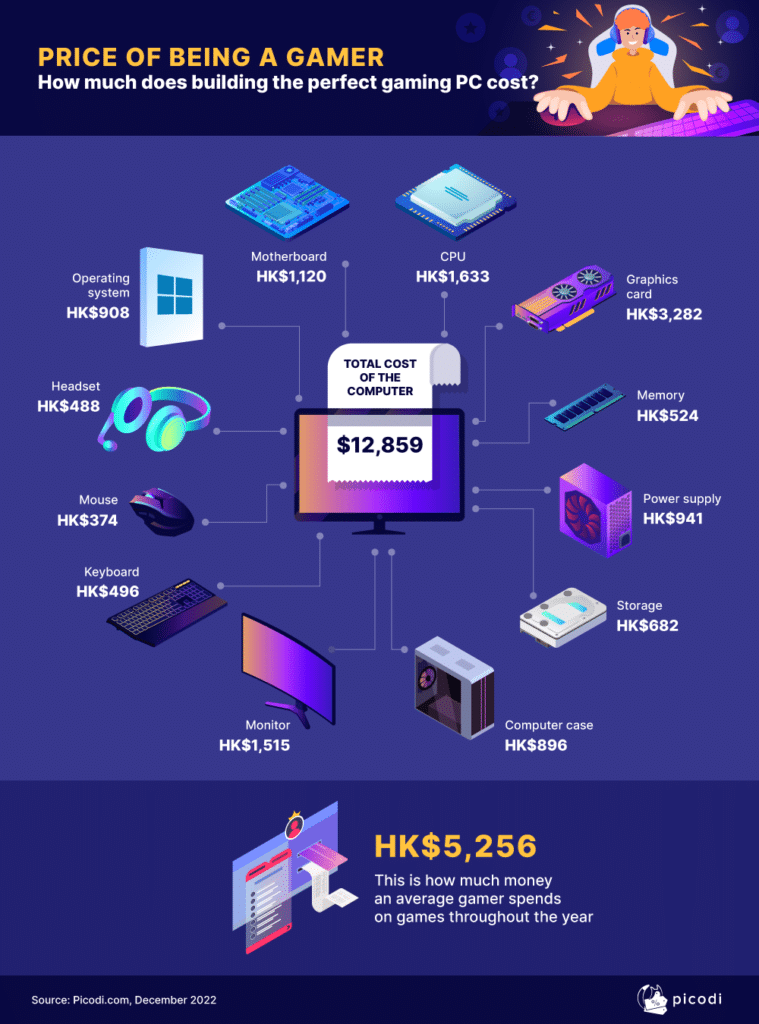
Expectations, timing, and priorities all go out the window if you blow your budget on the tower and forget what surrounds it.
Your gaming PC budget isn’t complete without accounting for these often-overlooked expenses:
Hidden Cost | Typical Price | Why It Matters for Your Factors |
Windows License | $0–$120 | Expectations: Free version works but has watermark |
Monitor | $150–$500 | Expectations: Your $2,000 PC is wasted on a $100 60Hz monitor |
Keyboard & Mouse | $50–$200 | Priorities: Cheap peripherals ruin the experience if you value feel/responsiveness |
Headset/Speakers | $50–$150 | Priorities: Audio matters more than you think—or maybe it doesn’t to you |
Games | $60–$120 | Expectations + Timing: Your first few titles add up fast; sales matter |
Shipping/Tax | 5–10% extra | Timing: Ordering during tax-free weekends or free-shipping promos saves real money |
Pro tip aligned with your priorities: If your total budget is $1,500, plan to spend about $1,200–$1,300 on the tower and save $200–$300 for the stuff around it. But if your priority is raw gaming performance and you already have a monitor/peripherals, ignore this and put it all into the tower.
Entry-Level Gaming PC Budget: What $600–$800 Gets You in 2026
Who Is an Entry-Level Gaming PC For?
Remember our three factors: expectations, timing, and priorities? This budget tier makes sense when all three align a specific way.
This budget is perfect for you if:
Factor | Your Situation |
Expectations | You’re happy with 1080p resolution at 60+ frames per second |
Timing | You’re buying now and not waiting for next-gen GPU releases |
Priorities | You value getting into PC gaming over max settings or 4K |
Specific audiences this fits:
- Casual gamers who play Fortnite, Valorant, League of Legends, Minecraft, and CS2
- Students building their first PC on a limited budget
- Console players switching to PC who want to try the ecosystem without breaking the bank
- Secondary PC builders creating a setup for a partner, child, or guest room
- Budget-conscious gamers who know they’ll upgrade later and want to start small
At this price point, you’re not getting ray tracing, 4K, or max settings in demanding AAA titles. But you are getting a legitimate gaming experience that beats any console at the same price.
$800 Entry-Level Gaming PC Build (2026 Parts List)
Here’s exactly what $800 gets you right now with current 2026 pricing:
Component | Recommended Part | Approx. Price | Why This Choice |
GPU | NVIDIA RTX 3060 12GB or AMD RX 6600 8GB | $250–$300 | Best price-to-performance for 1080p gaming |
CPU | Intel Core i5-12400F or AMD Ryzen 5 5600 | $130–$150 | More than enough for this GPU; won’t bottleneck |
Motherboard | B660 or B550 (budget-friendly) | $90–$110 | All the features you need, none you don’t |
RAM | 16GB DDR4 3200MHz | $50–$60 | 16GB is the 1080p gaming sweet spot in 2026 |
Storage | 500GB NVMe SSD | $35–$45 | Fast boot times, space for 3-5 main games |
Power Supply | 550W 80+ Bronze | $50–$60 | Reliable, efficient, enough headroom |
Case | Budget ATX case with included fans | $50–$70 | Saves money, decent airflow |
Total | $650–$800 | Leaves room for OS/peripherals if needed |
Pro tip: If you need to cut costs, start with the case and power supply. A $40 case and $45 PSU still work fine. Don’t cheap out on the GPU or SSD.
Entry-Level Gaming PC Performance: What FPS to Expect
The following table represent a realistic performance expectations of this entry-level build:
Game Title | Settings | Expected FPS | Experience |
Fortnite | Medium-High | 100–120 fps | Buttery smooth, competitive ready |
Valorant / CS2 | High | 144–200+ fps | Max refresh rate on 144Hz monitors |
Call of Duty: Modern Warfare III | Medium | 70–90 fps | Solid, playable, no major stutters |
Cyberpunk 2077 | Low-Medium + FSR | 50–60 fps | Playable, but you’ll notice compromises |
Baldur’s Gate 3 | Medium | 50–60 fps | Good experience, occasional dips |
Red Dead Redemption 2 | Medium | 55–65 fps | Beautiful even at medium settings |
Microsoft Flight Simulator | Low-Medium | 30–40 fps | Playable but not immersive |
The Honest Truth about this entry-level gaming PC performance:
- 1080p is your home. Don’t even think about 1440p or 4K at this budget.
- 60+ fps is achievable in almost every game with settings tweaks.
- You’ll use DLSS/FSR (upscaling technology) in newer AAA titles to hit smooth frame rates.
- Game-specific optimization matters. Well-optimized games (Fortnite, Valorant) run beautifully. Poorly optimized new releases will struggle.
Best Games for Budget Gaming PCs (And Which to Avoid)
These are the games that Plays Great on budget gaming PC:
- Fortnite, Valorant, League of Legends, Dota 2
- CS2, Rainbow Six Siege, Overwatch 2
- Minecraft, Roblox, Rocket League· GTA V, Fall Guys, Among Us
- Most indie games and previous-gen AAA titles
The following games are Playable With Tweaks in the entry-level pc setup:
- Call of Duty series (Modern Warfare, Warzone)
- Battlefield 2042, PUBG, Apex Legends
- Cyberpunk 2077, Starfield, Baldur’s Gate 3
- Hogwarts Legacy, Elden Ring
Don’t Bother (At This Budget):
- 4K gaming of any kind
- Ray tracing in demanding titles
- VR gaming (requires more GPU power)
- Max settings in 2025-2026 AAA releases
Budget Gaming PC Upgrade Path: What to Upgrade First
One of the smartest things about this budget tier? You can upgrade piece by piece. Here’s your roadmap:
Upgrade Priority | What to Upgrade | Cost | Performance Gain |
First | GPU to RTX 4070 or RX 7800 XT | $500–$600 | +50-70% more FPS, enables 1440p |
Second | Add more RAM (32GB) | $50–$60 | Better multitasking, streaming |
Third | Upgrade CPU to i7-13700K/Ryzen 7 5800X3D | $300–$350 | Helps with CPU-bound games |
Fourth | Add 1TB SSD for more games | $50–$70 | More storage, same speed |
Last | Replace PSU if needed for new GPU | $80–$100 | Only if upgrading to power-hungry cards |
The smart strategy: Use this $800 build for 1-2 years, then sell your GPU for $150–$200 and put that toward a $500 GPU upgrade. You’ll effectively get a mid-range PC for $1,100–$1,200 spread over time.
Best Prebuilt Gaming PCs Under $800 (2026)
Not everyone wants to build. Here are reputable prebuilts in the $800 range:
Brand | Model | Key Specs | Where to Buy |
Skytech | Chronos Mini | RTX 3050, i5-12400F, 16GB RAM | Amazon |
CLX | Set Gaming | RX 6600, Ryzen 5 5600, 500GB SSD | CLX website |
HP | Victus 15L | RTX 3060, i5-13400, 16GB RAM | Best Buy |
Dell | G15 | RTX 3050, i5-1335U, 8GB RAM | Dell.com |
Warning: Prebuilts at this price often cut corners on power supplies, motherboards, and RAM speed. But they offer warranty support and convenience.
$800 Gaming PC vs. PS5 and Xbox Series X: Which Should You Buy?
This $800 PC | PS5 | Xbox Series X | |
|---|---|---|---|
Price | $800 (more expensive) | $500 | $500 |
Game Library | Steam, Epic, Game Pass, emulators | PlayStation exclusives | Game Pass, Xbox exclusives |
Graphics | 1080p medium-high | 4K upscaled | 4K upscaled |
Upgradability | Yes, fully modular | No | No |
Used for work/school | Yes | No | No |
Online play cost | Free | $80/year | $60–$120/year |
If you only game and want 4K on a budget, get a console. If you want PC game libraries, mods, free online play, and a computer for other tasks, the $800 PC wins long-term.
Mid-Range Gaming PC Budget: What $1,200–$1,500 Gets You in 2026
Who Is a Mid-Range Gaming PC For?
This Mid-range gaming PC budget tier is where most gamers find their perfect match. Let’s see if it fits yours.
This budget is perfect for you if:
Factor | Your Situation |
Expectations | You want 1440p gaming at high settings with smooth frame rates |
Timing | You’re buying now and want something that stays relevant for 3-4 years |
Priorities | You value the sweet spot between price and performance over cutting-edge extremes |
Specific audiences this fits:
- Serious gamers who play a mix of competitive esports and AAA titles
- 1440p enthusiasts who want the resolution sweet spot without 4K prices
- Future-proofers (the smart kind) who want 3-4 years before upgrading
- Former console gamers ready to experience PC gaming at its best
- Content creators who game on the side and need decent multitasking power
This is the Mid-Range budget tier where PC gaming gets exciting. You’re not compromising anymor you’re choosing which games to play at high settings, not whether they’ll run at all.
$1,500 Mid-Range Gaming PC Build (2026 Parts List)
Here’s exactly what $1,500 gets you right now with current 2026 pricing:
Component | Recommended Part | Approx. Price | Why This Choice |
|---|---|---|---|
GPU | NVIDIA RTX 4070 Super 12GB or AMD RX 7800 XT 16GB | $550–$650 | 1440p king; handles ray tracing comfortably |
RAM | 32GB DDR5 6000MHz | $90–$110 | 32GB is the new sweet spot; DDR5 future-proofs you |
Storage | 1TB NVMe PCIe 4.0 SSD | $60–$80 | Fast load times, space for 8-12 main games |
Power Supply | 750W 80+ Gold (fully modular) | $90–$110 | Headroom for upgrades, efficiency, easier cable management |
Case | Mid-tower with excellent airflow (e.g., Fractal Pop, Corsair 4000D) | $80–$100 | Great thermals, easy building, looks clean |
CPU Cooler | Thermalright Peerless Assassin or comparable | $35–$45 | Air cooling is plenty; no need for AIO at this tier |
Total | $1,335–$1,595 | Right in the sweet spot |
Pro tip: If you need to trim $100, drop to a Ryzen 5 7600 and 16GB RAM. But if you can stretch to $1,500, this build sings.
[Affiliate links:]
- Check current RTX 4070 Super prices on Amazon
- Compare RX 7800 XT deals on Newegg
- View complete build kit on PCPartPicker
Mid-Range Gaming PC Performance: What FPS to Expect
What This Build Can Do:
Game Title | Settings (1440p) | Expected FPS | Experience |
|---|---|---|---|
Fortnite | Epic | 140–180 fps | Max settings, buttery smooth |
Call of Duty: Modern Warfare III | High-Ultra | 120–140 fps | Competitive settings with room to spare |
Cyberpunk 2077 | High + Ray Tracing Medium | 70–90 fps | With DLSS/FSR Quality; looks incredible |
Baldur’s Gate 3 | Ultra | 90–110 fps | No compromises, Act 3 stays smooth |
Red Dead Redemption 2 | Ultra | 80–100 fps | One of the best-looking games at max |
Competitive Shooters (Valorant/CS2) | High | 200–300+ fps | Max refresh rate on 240Hz+ monitors |
The Honest Truth about the Mid-Range Gaming PC Performance:
- 1440p is your playgroun. You’ll run almost everything at high-ultra settings.
- Ray tracing is finally viable. Not max settings in every game, but solid implementation.
- 100+ fps is the baseline in most titles. You’re getting the full benefit of high-refresh monitors.
- You can even try 4K in older games or less demanding titles (60+ fps).
1440p Gaming Performance: Resolution Deep Dive
Why is 1440p called the sweet spot? Let’s look at the numbers:
Resolution | Total Pixels | GPU Demand | Monitor Cost | Experience |
1080p | 2.1 million | Baseline | $100–$200 | Sharp enough, but pixels visible |
1440p | 3.7 million | +76% vs 1080p | $250–$400 | Perfect balance of sharpness and performance |
4K | 8.3 million | +124% vs 1440p | $500–$1000 | Gorgeous, but demands top-tier GPUs |
What this means for you:
This $1,500 build hits the 1440p sweet spot perfectly. You get:
- 76% more pixels than 1080p (much sharper image)
- Smooth 100+ fps in most games
- Monitor prices that won’t break the bank
- No need for a $2,000 GPU to drive it
Best Games for a $1,500 Gaming PC
Games That Shine at This Tier:
Game | Why It’s Great at This Budget |
Cyberpunk 2077: Phantom Liberty | Finally playable with ray tracing at 60+ fps |
Baldur’s Gate 3 | Ultra settings, no Act 3 slowdowns |
Alan Wake 2 | Experience next-gen visuals as intended |
Starfield | High settings with smooth frame rates |
Black Myth: Wukong | Demanding but beautiful; this tier handles it |
The Witcher 3 Next-Gen | Max settings + ray tracing, 80+ fps |
Hogwarts Legacy | Ultra settings, smooth throughout |
Red Dead Redemption 2 | One of the best-looking games ever, maxed out |
Games You Can Stream Comfortably:
- Fortnite/Valorant/CS2 at high settings while streaming at 1080p
- Call of Duty with streaming on a second monitor
- Variety streaming with overlays, alerts, and browser open
$1,500 Gaming PC Upgrade Path: What to Upgrade First
The beauty of this tier? You may not need to upgrade for years. But when you do:
Upgrade Priority | What to Upgrade | Cost | Performance Gain |
|---|---|---|---|
First (Year 3-4) | GPU to RTX 5070/6070 or equivalent | $600–$800 | +50-60% more FPS, enables 4K |
Second (If needed) | CPU to next-gen (Intel 15th/AMD 8000 series) | $400–$500 | Helps with CPU-bound titles |
Third (Year 2) | Add 2TB SSD for game library | $80–$120 | More storage, no performance gain |
Last (Year 5+) | Full platform upgrade | $1,000+ | New CPU, motherboard, RAM, GPU |
The smart strategy: Use this build for 3-4 years comfortably. Then sell your RTX 4070 Super for $250–$300 and put it toward a $600–$700 next-gen GPU. You’ll effectively get 4K-capable performance for a fraction of a full rebuild.
Best Prebuilt Gaming PCs Under $1,500 (2026)
Not everyone builds. Here are reputable prebuilts in the $1,200–$1,500 range:
Brand | Model | Key Specs | Price | Where to Buy |
|---|---|---|---|---|
Skytech | Chronos | RTX 4070, i5-14600K, 16GB DDR5, 1TB SSD | $1,449 | |
CLX | Set Gaming | RTX 4070 Super, Ryzen 7 7800X3D, 32GB DDR5 | $1,599 | |
HP | OMEN 40L | RTX 4070, i7-13700, 16GB DDR5, 512GB SSD | $1,399 | |
Corsair | Vengeance i7400 | RTX 4070, i7-13700F, 32GB DDR5, 1TB SSD | $1,549 | |
ABS | Master | RTX 4070 Super, Ryzen 7 7700, 16GB DDR5 | $1,499 |
What to watch for in prebuilts:
- Great for warranty and convenience
- Often use cheaper power supplies and motherboards
- May have slower RAM or single-channel configs
- Usually include Windows pre-installed ($100 value)
$1,500 Gaming PC vs. PS5 Pro and Xbox Series X
This $1,500 PC | PS5 Pro (Projected) | Xbox Series X | |
|---|---|---|---|
Price | $1,500 | $600–$700 (est.) | $500 |
Performance Tier | High-end 1440p / Entry 4K | 4K upscaled / 60fps | 4K upscaled / 60fps |
Game Library | Steam, Epic, Game Pass, emulators, mods | PlayStation exclusives | Game Pass, Xbox exclusives |
Ray Tracing | Good (medium-high settings) | Improved over base PS5 | Limited |
Upgradability | Yes, fully modular | No | No |
Used for work/school | Yes | No | No |
Online play cost | Free | $80/year | $60–$120/year |
Game prices | Sales often cheaper | Full price longer | Sales, Game Pass |
Over 5 years, the PC is cheaper when you factor in game prices and no online fees.
Monitor Recommendations for Your $1,500 Build
Your GPU is wasted on a cheap monitor. Here’s what to pair with this build:
Monitor Type | Recommendation | Price | Why |
|---|---|---|---|
Best All-Rounder | 27″ 1440p 165Hz IPS | $250–$350 | Perfect match; smooth, sharp, responsive |
Competitive Focus | 27″ 1440p 240Hz IPS | $400–$500 | For esports players wanting max refresh |
Budget Pick | 27″ 1440p 144Hz VA | $200–$250 | Good colors, slightly slower response |
Ultrawide Option | 34″ 1440p Ultrawide 144Hz | $400–$600 | Immersive, more screen real estate |
High-End Gaming PC Budget: What $2,000–$2,500 Gets You in 2026
Who Is a High-End Gaming PC For?
Let’s check in with our three factors one last time: expectations, timing, and priorities. This tier is where compromises die and dreams load at 4K resolution.
This budget is perfect for you if:
Factor | Your Situation |
|---|---|
Expectations | You want 4K gaming with ray tracing, max settings, and buttery frame rates |
Timing | You buy once and want 4-5 years before touching the inside again |
Priorities | You value the absolute best experience and have the budget to match |
Specific audiences this fits:
- 4K enthusiasts who want to see every pixel, every reflection, every shadow
- VR gamers who need the horsepower to drive headsets at high refresh rates
- Content creators who game, stream, edit, and render on the same machine
- “Buy once, cry once” builders who hate upgrading and want years of peace
- Enthusiasts who simply want the best because they love the hobby
This is the “no compromises” tier. You’re not asking “can it run this game?” You’re asking “how high can I push the settings?”
$2,500 High-End Gaming PC Build (2026 Parts List)
Here’s exactly what $2,500 gets you right now with current 2026 pricing:
Component | Recommended Part | Approx. Price | Why This Choice |
|---|---|---|---|
GPU | NVIDIA RTX 4080 Super 16GB or AMD RX 7900 XTX 24GB | $1,000–$1,200 | 4K monsters; ray tracing beasts |
CPU | Intel Core i7-14700K or AMD Ryzen 9 7950X3D | $400–$450 | No bottlenecks, ever. Even at 4K. |
Motherboard | Z790 or X670E (high-end with all features) | $250–$300 | PCIe 5.0, WiFi 6E/7, tons of USB, overclocking |
RAM | 32GB DDR5 6400MHz+ (or 64GB for creators) | $120–$200 | Blazing fast, future-proofed |
Storage | 2TB NVMe PCIe 4.0/5.0 SSD | $120–$180 | 2TB minimum; PCIe 5.0 for future titles |
Power Supply | 850W–1000W 80+ Gold/Platinum (fully modular) | $150–$200 | Headroom for overclocking and upgrades |
Case | High-airflow case with great aesthetics (Lian Li, Fractal, Corsair) | $150–$200 | Looks as good as it performs |
CPU Cooler | 360mm AIO liquid cooler | $120–$180 | Keeps that high-end CPU cool and quiet |
Case Fans | 3-4 high-quality PWM fans | $50–$100 | Optimize airflow and aesthetics |
Total | $2,360–$3,010 | Right in the enthusiast range |
If you’re gaming only, the Ryzen 7 7800X3D actually outperforms the 7950X3D in many games for $150 less. Save the money or put it toward a better GPU.
- Check current RTX 4080 Super prices on Amazon
- Compare RX 7900 XTX deals on Newegg
- View complete build kit on PCPartPicker
High-End Gaming PC Performance: What FPS to Expect
What a High-End Gaming PC Build Can Do:
Game Title | Settings (4K) | Expected FPS | Settings (1440p) | Expected FPS |
|---|---|---|---|---|
Cyberpunk 2077 | RT Overdrive + DLSS/FSR | 60–80 fps | Max + RT Ultra | 120–140 fps |
Call of Duty: Modern Warfare III | Max | 100–120 fps | Max | 200–240 fps |
Fortnite | Max + RT | 90–110 fps | Max + RT | 180–220 fps |
Baldur’s Gate 3 | Max | 80–100 fps | Max | 150–180 fps |
Alan Wake 2 | Max + RT + DLSS/FSR | 60–70 fps | Max + RT | 100–120 fps |
Red Dead Redemption 2 | Max | 90–110 fps | Max | 180–200 fps |
Microsoft Flight Simulator | High | 50–60 fps | Ultra | 80–100 fps |
Black Myth: Wukong | High + RT + DLSS/FSR | 60–70 fps | Max + RT | 110–130 fps |
The Honest Truth:
- 4K gaming is finally real. You’re getting smooth, playable frame rates at the highest resolution.
- Ray tracing is fully enabled. Not just “ray tracing on”—ray tracing maxed out.
- You have headroom. This build doesn’t break a sweat in most titles.
- VR is butter-smooth. No motion sickness, no stutters, pure immersion.
- You can stream and game on the same PC without breaking a sweat.
4K Gaming Performance: Is It Worth It?
“Let’s settle the 4K debate with actual data:”
Resolution | Total Pixels | GPU Demand | Visual Impact | Cost to Drive |
|---|---|---|---|---|
1080p | 2.1 million | Baseline | Reference | $300 GPU enough |
1440p | 3.7 million | +76% vs 1080p | Noticeably sharper | $500–$600 GPU |
4K | 8.3 million | +124% vs 1440p | Gorgeous, especially on large screens | $1,000+ GPU |
What you’re paying for:
Aspect | 1440p Experience | 4K Experience | Worth the Upgrade? |
|---|---|---|---|
Sharpness | Very good | Exceptional | Yes, on 32″+ screens |
Anti-aliasing | Needed | Barely needed | Saves GPU overhead |
Texture detail | High | Maximum | Yes, in modern games |
Ray tracing cost | Manageable | Heavy | Requires DLSS/FSR |
Monitor cost | $250–$400 | $500–$1,000 | Factor into budget |
If you have a 32″ or larger 4K monitor, absolutely go for it. If you’re on a 27″ screen, 1440p is still stunning and gives you higher frame rates.
Best Games for a $2,500 Gaming PC
Games That Show Off What This Build Can Do:
Game | Why It’s the Ultimate Showcase |
|---|---|
Cyberpunk 2077: Phantom Liberty | The ultimate ray tracing and path tracing showcase |
Alan Wake 2 | Mind-blowing visuals, best played at max settings |
Black Myth: Wukong | Demanding, beautiful, benefits from every dollar |
Microsoft Flight Simulator 2024 | Pushes CPU and GPU to their limits |
Star Wars Outlaws | Next-gen open world at its best |
The Witcher 3 Next-Gen | Max settings + all RT features, 100+ fps |
Horizon Forbidden West | Stunning on PC, max settings are a treat |
Avatar: Frontiers of Pandora | One of the best-looking games ever made |
VR Titles That Shine:
- Half-Life: Alyx at max settings, 120Hz
- Skyrim VR with mods (finally playable)
- Microsoft Flight Simulator in VR (the ultimate test)
$2,500 Gaming PC Upgrade Path: When Will You Need It?
The honest answer? Not for 4-5 years. Here’s your timeline:
Timeline | What You’ll Do | Cost |
|---|---|---|
Year 1-3 | Nothing. Enjoy max settings in everything. | $0 |
Year 4 | Consider GPU upgrade to next-gen (RTX 60-series) | $800–$1,000 |
Year 5 | Maybe add more RAM if 32GB becomes tight | $100–$150 |
Year 6 | Full platform rebuild (CPU, motherboard, RAM, GPU) | $2,000+ |
This is the “set it and forget it” tier. You’ve paid for years of peace. When you finally do upgrade in 4-5 years, sell your current GPU for $300–$400 and put it toward whatever monster card exists then.
Best Prebuilt Gaming PCs Under $2,500 (2026)
For those who want enthusiast performance without the build process:
Brand | Model | Key Specs | Price | Where to Buy |
|---|---|---|---|---|
Origin PC | Neuron | RTX 4080 Super, i7-14700K, 32GB DDR5, 2TB SSD | $2,499 | |
Falcon Northwest | Talon | RTX 4080 Super, Ryzen 9 7950X3D, 32GB DDR5, 2TB SSD | $2,599 | |
Corsair | Vengeance i7500 | RTX 4080 Super, i7-14700KF, 32GB DDR5, 2TB SSD | $2,399 | |
Maingear | Vybe | RTX 4080 Super, Ryzen 7 7800X3D, 32GB DDR5, 2TB SSD | $2,449 | |
CLX | Ra | RTX 4080 Super, i7-14700K, 32GB DDR5, 2TB SSD | $2,399 | |
Skytech | King 95 | RTX 4080 Super, i7-14700K, 32GB DDR5, 1TB SSD | $2,299 |
What you’re paying for in boutique builders:
- Hand-built, tested, and tuned
- Premium cabling and aesthetics
- Better customer support
- Usually higher-quality components (PSU, motherboard)
- Premium pricing ($200–$500 more than DIY)
$2,500 Gaming PC vs. PS5 Pro and High-End Consoles
This $2,500 PC | PS5 Pro (Projected) | Xbox Series X | |
|---|---|---|---|
Price | $2,500 | $600–$700 | $500 |
Performance Tier | True 4K / 60-100+ fps | 4K upscaled / 60fps | 4K upscaled / 60fps |
Ray Tracing | Full RT, path tracing capable | Improved but limited | Basic |
Game Library | Everything + mods + emulators + back catalog | PlayStation exclusives | Game Pass |
Upgradability | Yes, fully modular | No | No |
Used for work/creation | Yes (rendering, editing, streaming) | No | No |
Online play cost | Free | $80/year | $60–$120/year |
4-Year Cost | $2,500 + games | $700 + $320 online = $1,020 + games | $500 + $240 online = $740 + games |
The honest comparison:
- If you only game casually: A console is smarter financially
- If you love games as a hobby: This PC delivers an experience no console can touch
- If you create content: This PC pays for itself
- If you want the absolute best: This is the only choice
Best 4K Monitors for Your $2,500 Build
You spent $2,500 on a PC. Don’t ruin it with a $200 monitor.
Monitor Type | Recommendation | Price | Why |
|---|---|---|---|
Best All-Rounder | 32″ 4K 144Hz IPS | $600–$800 | Perfect balance of size, resolution, and speed |
Competitive Focus | 27″ 4K 240Hz IPS | $800–$1,000 | For gamers who want both resolution and speed |
OLED Experience | 32″ 4K 240Hz OLED | $1,000–$1,300 | Infinite contrast, perfect blacks, stunning HDR |
Ultrawide Alternative | 45″ 1440p Ultrawide 240Hz OLED | $1,200–$1,500 | Immersive, but lower pixel density |
Budget 4K Option | 28″ 4K 144Hz IPS | $400–$500 | Good entry point if you’re stretched |
An OLED monitor transforms your gaming experience. If you can stretch your budget, the LG C3 42″ OLED TV is actually an amazing gaming monitor for $900–$1,000.
Should You Wait for Next-Gen GPUs?
This is the eternal question at this tier. Here’s the 2026 reality:
Upcoming | Expected Release | Worth Waiting? |
|---|---|---|
NVIDIA RTX 50-series | Late 2026 / Early 2027 | If you can wait 6-12 months |
AMD RDNA 4 | Late 2026 | Probably not; incremental gains expected |
Intel Battlemage | Mid 2026 | Unlikely to compete at this tier |
There’s always something better coming. If you wait for next-gen, you’ll wait forever. The RTX 4080 Super will play everything at 4K for years. Buy now, enjoy now.
Frequently Asked Questions About Gaming PC Budgets
Still have questions? Here are answers to the most common questions about gaming PC budgets in 2026.
Which Gaming PC Budget Is Right for You?
Let’s Bring It All Together
We’ve covered a lot of ground. Here’s your simple decision guide:
If You’re on a Tight Budget: $600–$800
Choose this if: You’re a student, casual gamer, or just want to get your foot in the door.
You’ll get: Solid 1080p gaming, 60+ fps in most titles, a foundation you can upgrade later.
Remember: You’re buying for today, not five years from now. And that’s perfectly okay.
Jump to the Entry-Level section for full details.
If You Want the Sweet Spot: $1,200–$1,500
Choose this if: You’re a serious gamer who wants 1440p high settings and 3-4 years of worry-free gaming.
You’ll get: The best price-to-performance ratio in 2026. 1440p at 100+ fps, ray tracing that actually works, and enough power for streaming or content creation on the side.
Remember: This is where PC gaming gets exciting. Most gamers should be here.
Jump to the Mid-Range section for full details.
If You Want the Absolute Best: $2,000–$2,500
Choose this if: You want 4K, ray tracing, max settings, and 4-5 years before you even think about upgrading.
You’ll get: No compromises. Every game at its best. VR that’s actually smooth. A machine that makes your friends jealous.
Remember: You’ve paid for peace of mind. Enjoy it.
Jump to the High-End section for full details.
Final Thought
The best gaming PC budget is the one that fits your life.
Not your friend’s life. Not some YouTuber’s life. Your life. Your expectations. Your timing. Your priorities.
Whether you spend $800 or $2,500, what matters is that you’re gaming. You’re part of this incredible hobby. And now you have the knowledge to make a smart choice.
Welcome to PC gaming. See you online.
Have questions about your specific build? Drop them in the comments below, or check out our other guides:
- How to Build Your First Gaming PC (coming soon)
- Best GPUs for Every Budget 2026
- Gaming Monitor Buying Guide (coming soon)
- Prebuilt vs DIY: Which Should You Choose? (coming soon)